
Testing Cloud RADIUS connectivity
In this topic, you will learn what you can do to test the connectivity between your devices and Portnox™ Cloud RADIUS servers.
Testing using the Portnox RADIUS Client script
In this section, you will learn about the PortnoxRADIUSclient.ps1 PowerShell script for testing and troubleshooting RADIUS connectivity.
The Portnox RADIUS Client script (PortnoxRADIUSclient.ps1) is a PowerShell script written by Portnox professionals to help customers quickly test RADIUS connectivity and troubleshoot issues without the need to open a support ticket.
To run PowerShell on Linux or macOS:
-
macOS: Follow the Microsoft instructions to install PowerShell on macOS. Once installed, open your Mac Terminal application and run the pwsh command to switch from your default Zsh shell into the PowerShell environment.
-
Linux: Follow the Microsoft instructions to install PowerShell on Linux. Once installed, open your Linux Terminal application and run the pwsh command to switch from your default Bash shell into the PowerShell environment.
To get the Portnox RADIUS Client script:
-
Manual Download: Download the script manually from the Portnox GitHub repository using your web browser.
-
Via Windows PowerShell: If you are on Windows, open your PowerShell console and run either Invoke-WebRequest or the built-in Windows curl.exe command:
Invoke-WebRequest -Uri "https://raw.githubusercontent.com/portnox/scripts/main/PortnoxRADIUSclient.ps1" -OutFile "PortnoxRADIUSclient.ps1"curl.exe -L "https://raw.githubusercontent.com/portnox/scripts/main/PortnoxRADIUSclient.ps1" -o "PortnoxRADIUSclient.ps1" -
Via macOS or Linux Native Terminal: Before entering PowerShell, open your standard Mac Terminal or Linux shell and use the system’s native curl command to download the file directly into your current directory:
curl -L "https://raw.githubusercontent.com/portnox/scripts/main/PortnoxRADIUSclient.ps1" -o "PortnoxRADIUSclient.ps1" -
Via macOS or Linux PowerShell Environment: If you have already launched PowerShell (pwsh) on your Mac or Linux system, use the cross-platform Invoke-WebRequest cmdlet. Do not use curl or wget inside Mac or Linux PowerShell, as those native aliases are disabled on Unix systems to prevent conflicts:
Invoke-WebRequest -Uri "https://raw.githubusercontent.com/portnox/scripts/main/PortnoxRADIUSclient.ps1" -OutFile "PortnoxRADIUSclient.ps1"
Parameters:
-
-Server: The IP address or hostname of the RADIUS server. For Cloud RADIUS, find this value in Portnox Cloud under . For RadSec, use hostnames only as listed in this KB: What are the fully qualified domain names (FQDNs) of Cloud RADIUS servers. -
-Port: The RADIUS authentication port. Find this value in Portnox Cloud in the same location as the server IP address. Defaults to 1812 for RADIUS transport and 2083 for RadSec transport if not specified. -
-Transport: The transport protocol to use. Use RADIUS for standard UDP RADIUS, or RADSEC for RADIUS over TLS. -
-AuthType: The authentication method to use. Accepted values are PAP, MAB, EAP-TLS, EAP-PEAP, and EAP-TTLS. -
-SharedSecret: The shared secret configured for the RADIUS server. Find this value in Portnox Cloud in the same location as the server IP address. For RadSec transport, the shared secret is always radsec. -
-Username: The username to authenticate. For PAP and EAP methods, this is the user’s login name or email address. For MAB, this is ignored – use-CallingStationIdinstead. -
-Password: The password for the user account. Required for PAP, EAP-PEAP, and EAP-TTLS. Not used for EAP-TLS or MAB. -
-NasPortId: The name of the SSID or switch port from which the authentication request originates (RADIUS Attribute 87). Use the name of an SSID or port that is configured in Portnox Cloud. -
-NasPortType: The type of port the client is connecting from (RADIUS Attribute 61). Use 19 for Wireless 802.11 (Wi-Fi), 15 for Ethernet, or 18 for other wireless connections. -
-CallingStationId: The MAC address of the client device, in the format 00-11-22-33-44-55. Required for MAB authentication. Optional for other methods. -
-CalledStationId: The MAC address or identifier of the NAS device (access point or switch). Optional. -
-NasIpAddress: The IP address sent as the NAS-IP-Address attribute in the Access-Request packet. Defaults to 127.0.0.1 if not specified. -
-NasIdentifier: A string identifying the NAS device in the Access-Request packet. Defaults to Test-RadSec-Script if not specified. -
-EapServerName: The DNS name on the RADIUS server certificate, used for EAP server certificate validation during EAP-TLS, EAP-TTLS, and EAP-PEAP authentication. For Portnox Cloud, use the hostname of the RADIUS server as listed in this KB: What are the fully qualified domain names (FQDNs) of Cloud RADIUS servers. Defaults to the value of-Serverif not specified. -
-EapRootCACertPath: The path to the root CA certificate file used to validate the RADIUS server’s EAP certificate. Required for EAP-TLS, EAP-TTLS, and EAP-PEAP unless-SkipEapServerCertCheckis used. -
-EapClientCertPath: The path to the client certificate file (in .p12 or .pfx format) used for EAP-TLS inner authentication. -
-EapClientCertPassword: The password for the EAP client certificate file, if the file is password protected. -
-RootCACertPath: The path to the root CA certificate used to validate the outer RadSec server certificate. Required when using RadSec transport unless-SkipCertificateCheckis used. -
-ClientCertPath: The path to the client certificate used for mutual TLS in the RadSec outer connection, if the server requires it. -
-ClientCertPassword: The password for the RadSec outer client certificate, if the file is password protected. -
-PeapOuterIdentity: The identity sent in the outer EAP-PEAP tunnel. Defaults to the value of-Username. Use-UseAnonymousPeapOuterIdentityto send anonymous instead. -
-PeapInnerIdentity: The identity used inside the PEAP tunnel for MSCHAPv2. Defaults to the value of-Username. -
-TimeoutSeconds: The per-request timeout in seconds. Defaults to 15. -
-MaxEapRounds: The maximum number of EAP rounds before the script aborts. Defaults to 60. -
-MaxEapTlsFragmentSize: The maximum TLS payload size per outbound EAP-TLS, EAP-TTLS, or EAP-PEAP fragment, in bytes. Defaults to 900. -
-SkipEapServerCertCheck: Switch. Disables validation of the EAP server certificate. Use in lab or troubleshooting environments only. -
-SkipCertificateCheck: Switch. Disables validation of the outer RadSec server certificate. Use in lab or troubleshooting environments only. -
-SkipRevocationCheck: Switch. Disables certificate revocation checking for the outer RadSec connection. -
-UseAnonymousPeapOuterIdentity: Switch. Sends anonymous (or anonymous@realm for UPN-style identities) as the PEAP outer identity. -
-continuous: Switch. Runs the script in a loop with the same parameters and displays a rolling ASCII chart of response times in milliseconds.Warning:This switch may cause a flood of requests and the Portnox Cloud RADIUS server may treat this as a potential DoS attack, blocking your IP address. To unblock it, go to: -
-DebugOutput: Switch. Enables detailed diagnostic logging, including packet parsing and TLS fragment output. -
-Orion: Switch. Enables SolarWinds SAM compatibility mode. When present, the script outputsStatisticandMessagekeys for SAM PowerShell Script Monitor, and sets the exit code to 0 for Access-Accept, 3 for Access-Reject, and 1 for any other failure.
- Specify
Orionas the very first parameter. - Replace all parameter dashes with commas.
- Replace all parameter spaces with equals signs.
Examples
\) to forward slashes (/) in file paths; while PowerShell Core can often
translate Windows-style paths on Unix systems, using forward slashes prevents syntax errors and ensures cross-platform
compatibility.-
RADIUS PAP authentication for a wireless network SSID:
.\PortnoxRADIUSclient.ps1 ` -Server RADIUS server IP or hostname ` -Port RADIUS port ` -Transport RADIUS ` -SharedSecret shared secret ` -AuthType PAP ` -Username username ` -Password password ` -NasPortId SSID or port name ` -NasPortType 19 -
RadSec PAP authentication over a wired network interface:
.\PortnoxRADIUSclient.ps1 ` -Server RADIUS server FQDN ` -Port RADIUS port ` -Transport RADSEC ` -SharedSecret radsec ` -AuthType PAP ` -Username username ` -Password password ` -RootCACertPath root certificate path ` -NasPortId interface name ` -NasPortType 15 -
RADIUS EAP-PEAP (MSCHAPv2) authentication over VPN with diagnostic logging:
.\PortnoxRADIUSclient.ps1 ` -Server RADIUS server IP address ` -Port RADIUS port ` -Transport RADIUS ` -SharedSecret shared secret ` -AuthType EAP-PEAP ` -Username username ` -Password password ` -EapServerName clear-rad.portnox.com ` -EapRootCACertPath root certificate path ` -DebugOutput -
RadSec EAP-PEAP (MSCHAPv2) authentication over VPN with diagnostic logging:
.\PortnoxRADIUSclient.ps1 ` -Server RADIUS server FQDN ` -Port RADIUS port ` -Transport RADSEC ` -SharedSecret radsec ` -AuthType EAP-PEAP ` -Username username ` -Password password ` -RootCACertPath root certificate path ` -EapServerName clear-rad.portnox.com ` -EapRootCACertPath root certificate path ` -DebugOutput -
RADIUS EAP-TLS certificate-based authentication for a wired interface with diagnostic logging:
.\PortnoxRADIUSclient.ps1 ` -Server RADIUS server IP address ` -Port RADIUS port ` -Transport RADIUS ` -SharedSecret shared secret ` -AuthType EAP-TLS ` -Username username ` -EapClientCertPath client certificate path ` -EapServerName clear-rad.portnox.com ` -EapRootCACertPath root certificate path ` -NasPortId interface name ` -NasPortType 15 ` -DebugOutput -
RadSec EAP-TLS certificate-based authentication for a wireless network with diagnostic logging:
.\PortnoxRADIUSclient.ps1 ` -Server RADIUS server FQDN ` -Port RADIUS port ` -Transport RADSEC ` -SharedSecret radsec ` -AuthType EAP-TLS ` -Username username ` -RootCACertPath root certificate path ` -EapClientCertPath client certificate path ` -EapServerName clear-rad.portnox.com ` -EapRootCACertPath root certificate path ` -NasPortId Portnox ` -NasPortType 19 ` -DebugOutput -
RADIUS MAC Authentication Bypass (MAB) over a wired Ethernet interface with diagnostic logging:
.\PortnoxRADIUSclient.ps1 ` -Server RADIUS server IP address ` -Port RADIUS port ` -Transport RADIUS ` -SharedSecret shared secret ` -AuthType MAB ` -CallingStationId mac address ` -NasPortId interface name ` -NasPortType 15 ` -DebugOutput -
Monitoring via SolarWinds Orion:
Orion,Server=RADIUS server IP or hostname,Port=RADIUS port,Transport=RADIUS,SharedSecret=shared secret,AuthType=PAP,Username=username,Password=password,NasPortId=Portnox,NasPortType=19
Testing using other tools
In this section, you will learn about some other tools that you can use to test RADIUS connectivity.
In addition to the Portnox RADIUS client script, you can also use other scripts and applications for RADIUS server connectivity testing. You can use any such application you like, the following are our recommendations:
-
The Portnox LocalRadFWTest script. For information about this script developed by Portnox technical staff, see the following section: Script to check connectivity.
-
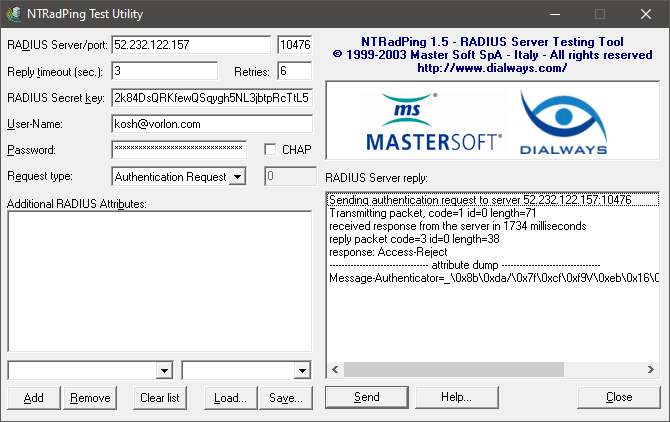
Windows: NTRadPing: free, GUI-based utility.
-
macOS: EAPTest: paid, GUI-based app.
-
Linux: FreeRADIUS: open-source, contains a command-line utility radtest.
-
Cross-platform: RadPerf: free, command-line utility with packages for several operating systems.
Unavailable methods
In this section, you will learn about methods that you should not use to test RADIUS connectivity.
The following test methods will not work:
-
ICMP Ping (Echo): Portnox Cloud RADIUS servers are hosted in Microsoft Azure, and Microsoft does not allow ICMP Echo Request or Echo Rely packets in Azure. If you try to ping the RADIUS server, you will get no answer. For the same reason, ICMP-based traceroute command will not work, either.
-
UDP Echo: At the moment the Portnox Cloud RADIUS servers do not respond to generic UDP requests, including UDP Echo. However, we are considering introducing this support in the future.