
How to check if two network interfaces belong to the same Intune-managed device?
In this topic, you will learn how to use session details to check if two network interfaces belong to the same Intune-managed device, and therefore are treated as a single device and consume only one license.
-
On the Alerts screen, find an authentication alert for the network interface that you want to check, and click on the
Session details link.

-
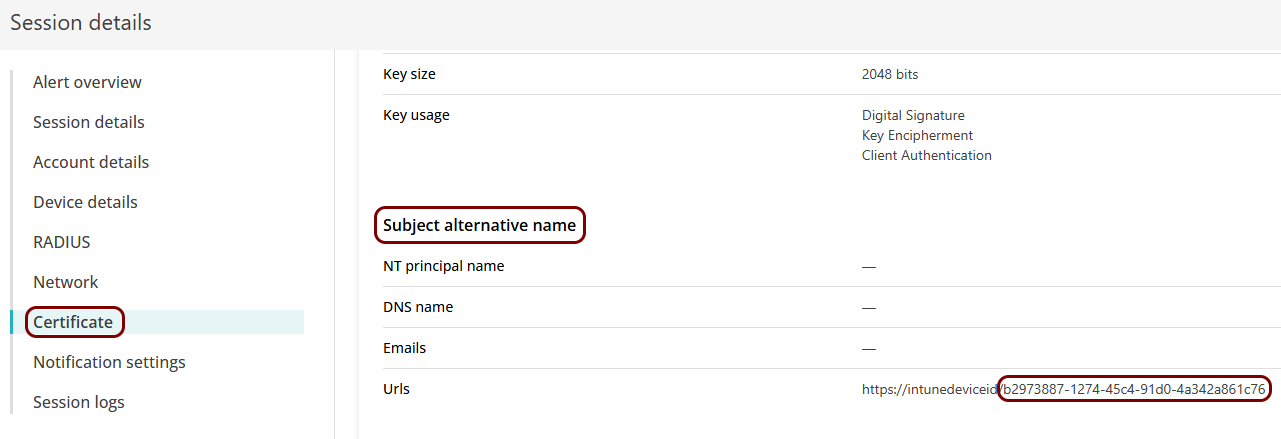
In the Session details window, select the Certificate option in the
left-hand side menu, and then scroll to the Subject alternative name section. If there is a value
in the Urls row that begins with https://intunedeviceid/, note down the
value after the last / symbol.
 Note:If there is no value in the Urls row or the value does not begin with https://intunedeviceid/, the device is either not managed by Intune, or the SCEP settings in Intune are incorrect. As a result, this network interface cannot be associated with an Intune-managed device, and will consume a separate license.
Note:
To include the Intune device ID in the certificate obtained by SCEP, follow the steps in our Intune guides, for example:
Onboard Windows devices with certificates using Microsoft Intune and SCEP. If you use your own certificate authority for clients and distribute
them, for example, using group policy, you must add this information to each certificate or else Portnox Cloud will have no
way to associate network interfaces to devices.
Important:
If you see multiple devices in Portnox Cloud with the same hostname or serial number, compare their
Intune device IDs by following the procedure in this topic. Devices that have different Intune device IDs are treated as
separate devices, even if they represent the same physical device. This situation may occur after a device is re-enrolled in
Intune, which creates a new Intune device record and a new device ID. For some time, both entries may appear active in
Portnox Cloud until the older device record stops authenticating and is automatically archived.