
How to access virtual machine logs using SSH
In this topic, you will learn how to troubleshoot problems with the operation of the local RADIUS or local TACACS+ instance in a virtual machine by using the PuTTY application, the SSH protocol, and Linux shell commands.
The local RADIUS/TACACS+ runs on Linux, so you can use base Linux shell commands to troubleshoot it. For more information about local RADIUS, see the following topic: How do local RADIUS servers work?. For more information about local TACACS+, see the following topic: How does the Portnox Cloud TACACS+ service work?.
Connect to the virtual machine using Windows PowerShell
In this section, you will learn how to configure the local RADIUS or local TACACS+ instance to work with SSH and then how to connect to it using Windows PowerShell.
-
In Portnox Cloud, make sure that the Enable SSH checkbox is active in the local RADIUS configuration or the TACACS+ configuration.

-
Connect to the instance using PowerShell:
-
In Portnox Cloud, in the local RADIUS/TACACS+ instance
configuration, click on the Download private SSH key link and save the
private.key file to a local directory.

-
In Portnox Cloud, in the local RADIUS/TACACS+ instance
configuration, click on the Download private SSH key link and save the
private.key file to a local directory.
Download log files to local disk
In this section, you will learn how to use Windows PowerShell to download the log files to your local disk so you can attach them to your support ticket.
-
In Portnox Cloud, make sure that the Enable SSH checkbox is active in the local RADIUS configuration or the TACACS+ configuration.
-
In Portnox Cloud, in the local RADIUS/TACACS+ instance
configuration, click on the Download private SSH key link and save the
private.key file to a local directory.
Connect to the virtual machine using PuTTY
In this section, you will learn how to configure the local RADIUS or local TACACS+ instance to work with SSH and then how to connect to it using the PuTTY application (for Windows).
You may prefer to use PuTTY instead of PowerShell due to additional capabilities of this software such as the ability to log all output to a file.
-
In Portnox Cloud, make sure that the Enable SSH checkbox is active in the local RADIUS configuration or the TACACS+ configuration.
-
Connect to the instance using the PuTTY application:
-
In Portnox Cloud, in the local RADIUS/TACACS+ instance configuration, click on the Download
PuTTY SSH key link and save the private.ppk file to a local
directory.

-
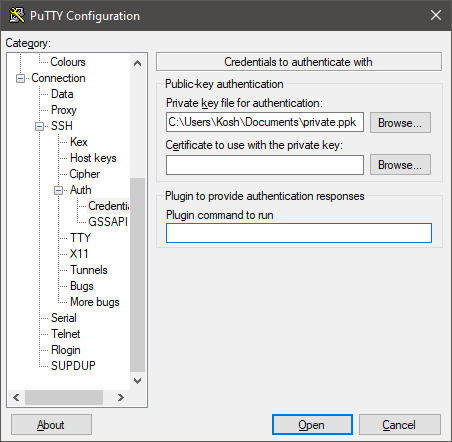
In the PuTTY configuration window, go to and in the Private key file for authentication, select the PuTTY SSH
key (private.ppk) that you downloaded earlier.
-
At the login as: prompt, type
tcand press the Enter key.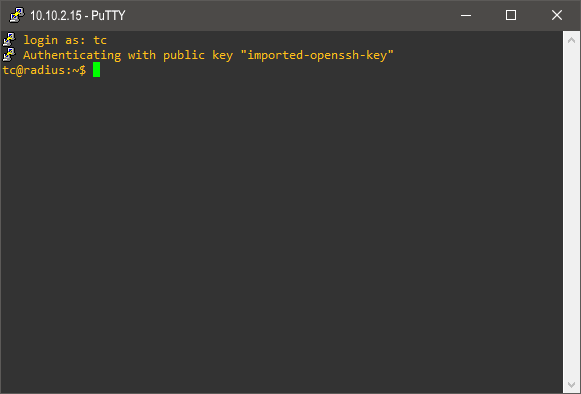
-
In Portnox Cloud, in the local RADIUS/TACACS+ instance configuration, click on the Download
PuTTY SSH key link and save the private.ppk file to a local
directory.
- Optional:
If the above step returns an error, do as follows:
Note:Do this if you get errors in PuTTY such as: Unable to load private key (createkey failed), Permission denied, or No supported authentication methods available (server sent: publickey).
-
In local RADIUS/TACACS+ instance configuration, click on the Download private SSH
key link and save the private.key file to a local directory.
-
Run the PuTTYgen application, which is part of the PuTTY package.
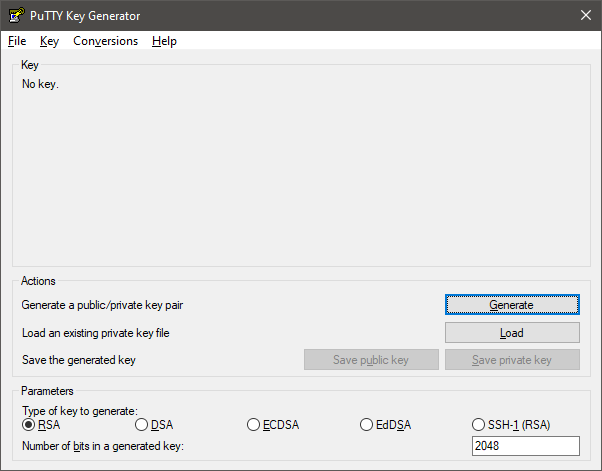
-
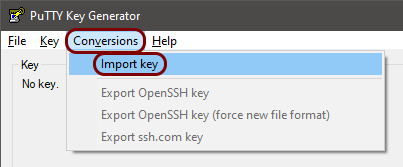
In PuTTYgen, select the menu option and import the downloaded private.key file.
-
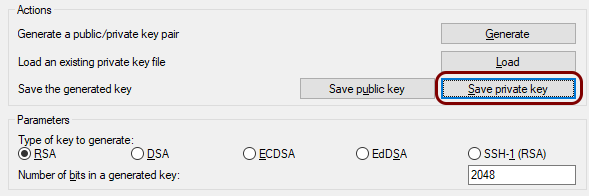
Click on the Save private key button.
-
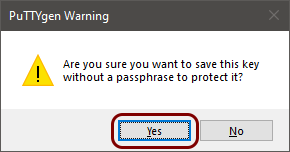
In the PuTTYgen Warning window, click on the Yes button.
-
In local RADIUS/TACACS+ instance configuration, click on the Download private SSH
key link and save the private.key file to a local directory.
Troubleshoot using Linux commands
In this section, you will learn what Linux commands to use to troubleshoot the RADIUS or local TACACS+ virtual machine instance.